Initial Tips:
- If you’re ever lost, notice that the title in the left corner is the home button!
- You can just use the back and forward arrows on your web browser if you click the wrong link or need to go back
How to Navigate this Site & Page
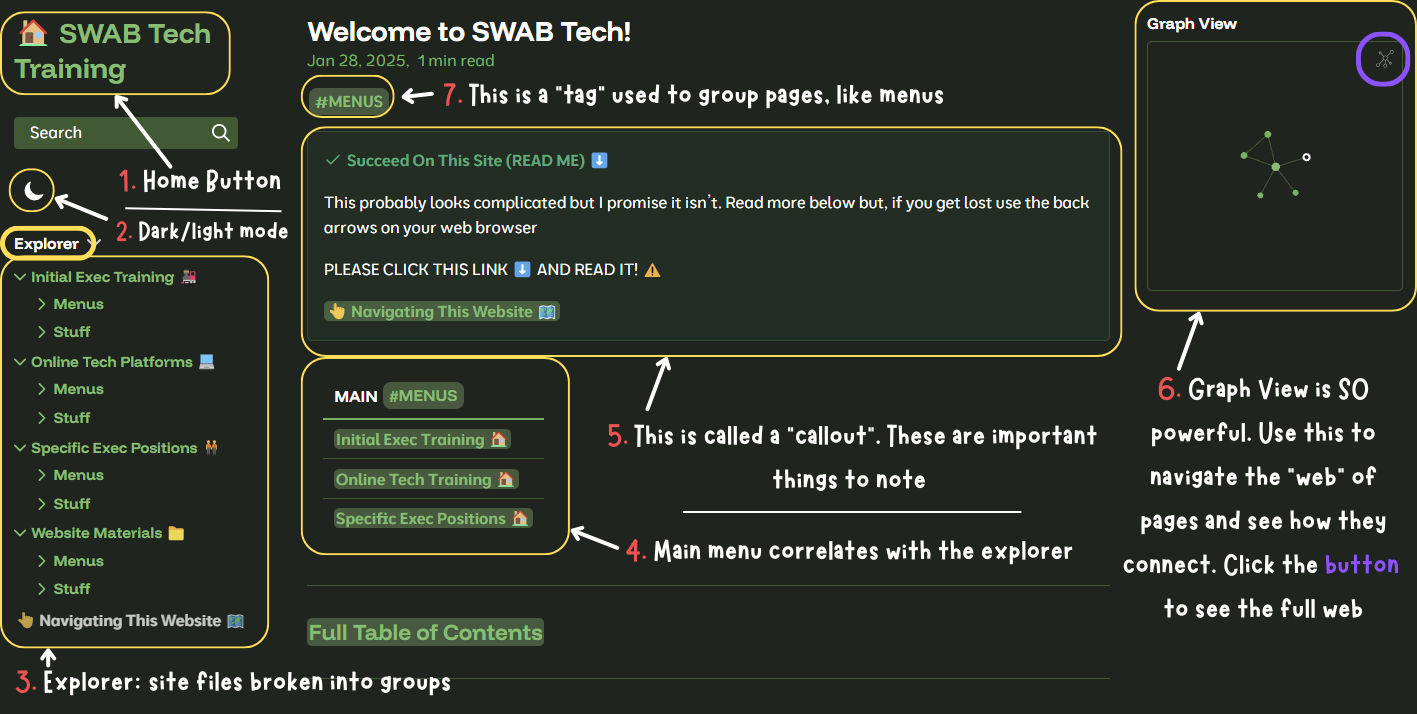 Follow the numbers above ⬆️
- Home Button 🏠
- You can always click here to return to the main page (& main menu)
- Dark/Light Mode 🌙
- Switch between your favorite looks
- Explorer
- Site pages are sorted into folders based on purpose which correlates with the Main Menu
- Each folder has a note titled “🏠Title Here” which is the “home menu” for the folder. If you get lost go there
- Main Menu
- Each folder will have a menu like this so you can navigate the content in the folder
- Callouts
- These will be used throughout the site to help highlight things you need to read
- ALWAYS take a look
- Graph View
- SUPER POWERFUL TOOL
- Allows you to visualize the “paths” between linked files
- THIS is how you’re supposed to navigate/visualize the site
- Click the button in the upper right corner to expand the view
- Tags
- These are used to group like pages so you can find them easier
- Ex: “EARLY BIRD” will be used to mark all pages that are about Early Bird
Icons
- 👆 : hover or click on the links
- 🔎 : take a look at this info, its important
- ⬅️⬇️ : follow the arrow where it says to go
- 🎬 : video guide, watch me explain on video
- 🏠 : this is a home menu for a folder