Chat is SWAB’s information and communication hub. In this app, we utilize Spaces and Direct Messages to communicate outside of meetings, share 🏠Google Drive files, and utilize Google Meet to have quick meetings and check-ins across the week.
IMPORTANT
This app is very important during the year. We really need to stick to it for SWAB “business” and everyone needs to be really comfortable using it on the reg. Madden will be sending things out and we will all be communicating on it so please look into this guide as a start to becoming comfortable. This is the most in depth guide and please read it FULLY!!!
🎬Watch the FULL video walkthrough here (Coming Soon)
How to Navigate the Main Page
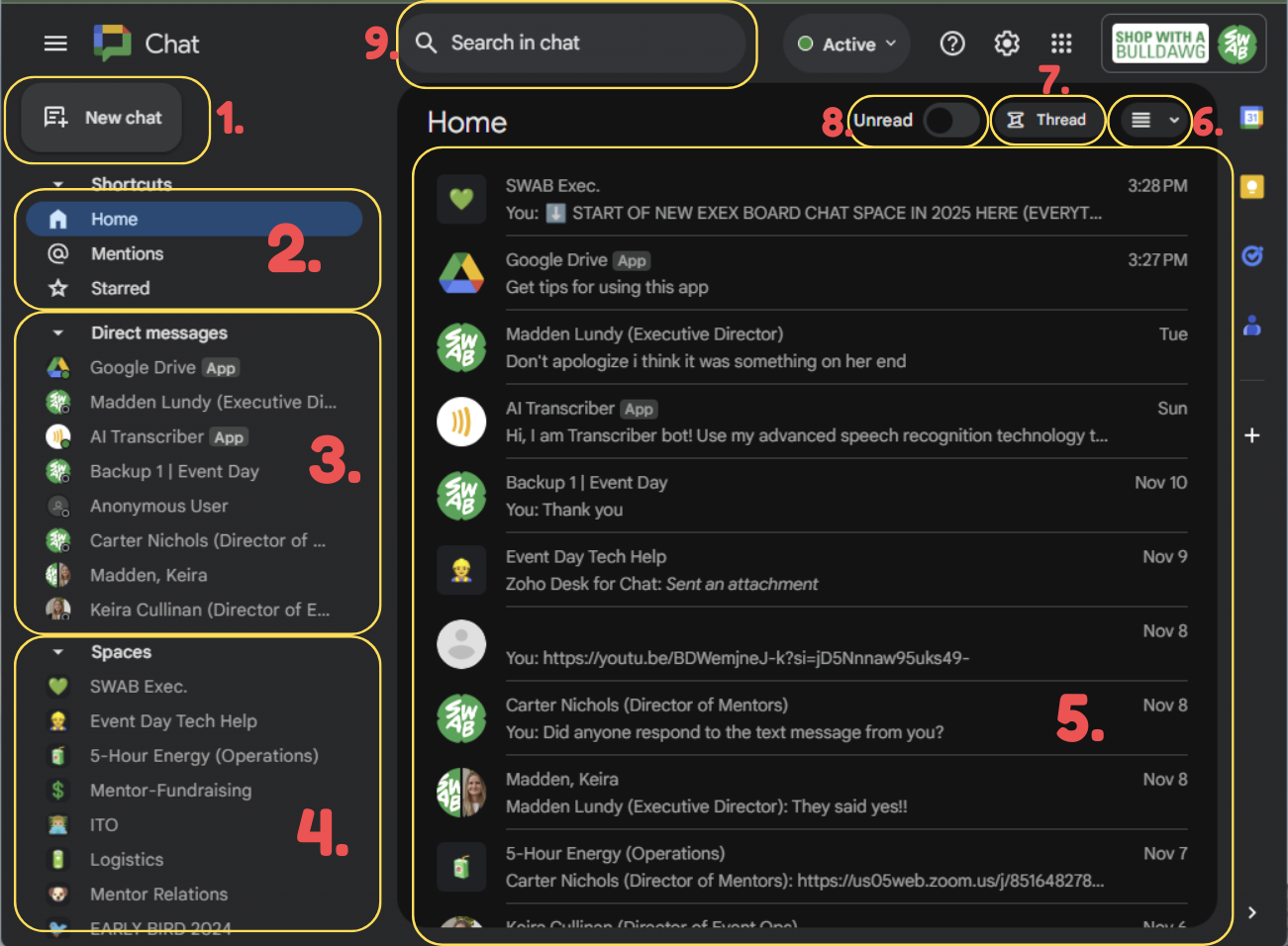 ]
FOLLOW THE NUMBERS FROM ABOVE ⬆️
]
FOLLOW THE NUMBERS FROM ABOVE ⬆️
- New Chat: This allows you to…
- Search & select exec contacts to Direct Messages
- Add multiple contacts and create a new Spaces
- Browse other spaces in the SWAB SWorkspace you might need to join in the future
- Shortcuts: Buttons for…
- Home (the main page)
- The others are not important TBH
- Direct Messages
- Chat with everyone! You can make group chats too!
- Spaces
- The core groups of G Chat
- Home Page
- This is just a chronicled list of DM’s, spaces, threads etc.
- Is not organized but can show you most recent conversations
- Split Pane Mode
- Clicking this toggles chat to split into two view windows to maximize productivity
- Allows Spaces and Direct Messages to be side by side
- Threads
- Incredibly helpful to keep chat organized in spaces & DMS
- Read/Unread Toggle
- Allows you to either only see unread messages
- Chat Search
- Used to search the Chat app (or specific spaces)